
 Pin a position to keep it in the island
Check your account fits.
Position coverage is narrower than public market coverage. A listed market does not guarantee support for its account or collateral type.
- Binance: standard single-asset USDⓈ-M accounts, USDT balances and USDT perpetual positions. Spot, COIN-M, other collateral, Multi-Assets and Portfolio Margin are excluded. Dated futures may affect balances but are not shown as positions.
- OKX: Spot and Futures account modes (levels 1 and 2), trading equity and USDT perpetual positions. Multi-currency margin, Portfolio Margin and other position products are excluded.
- Hyperliquid: mainnet default perpetual account equity and positions in USDC. Spot balances, HIP-3, testnet, unified accounts and Portfolio Margin are excluded.

Standard single-asset USDⓈ-M
USDT perpetuals · read-only API key & secret
Account levels 1 / 2
USDT linear perpetuals · API key, secret & passphrase
Default mainnet perpetual account
Public address watch · no wallet private keyConnect only what you need.
Open Settings → Accounts & positions → Connect account. Choose the exchange and name the connection. Monitoring requires Pro or an active trial.
- 1
Binance: reading only
Create a dedicated API key in Binance API Management with Reading enabled. Keep trading, Futures trading, transfers and withdrawals disabled. Enter its API key and secret, then choose Verify and connect. If Futures reads are denied, check the key and IP allowlist; do not enable trading to bypass the error.
- 2
OKX: match the account region
Create an API key with Read permission only; Trade and Withdraw must be off. Choose the account’s region, then enter the API key, secret and API passphrase. This passphrase belongs to the API key, not your Mac login. Choose Verify and connect.
- 3
Hyperliquid: use the position address
Enter the public 0x address that actually holds the positions, including a subaccount address when applicable. Do not enter an API-wallet address, private key or recovery phrase. No wallet connection or signature is needed; watching an address does not prove ownership.
Browsing and pinning are different.
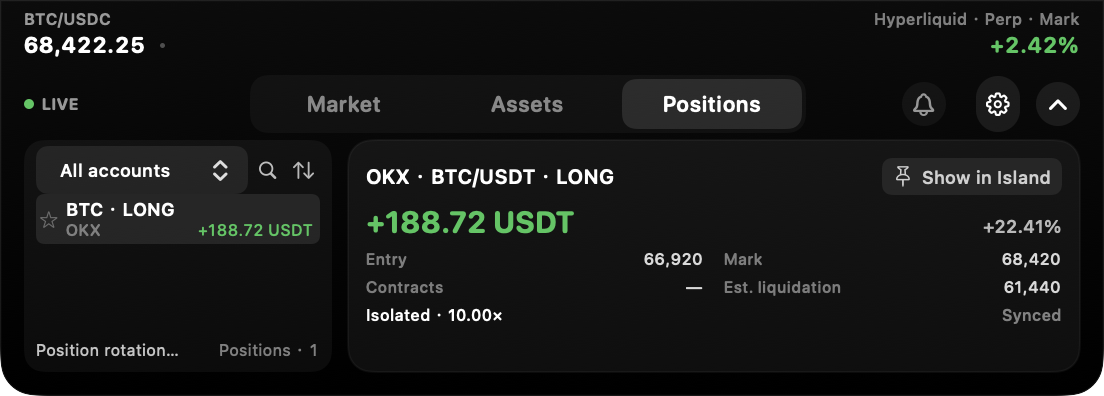
Enable Show balances and positions in account settings. Expand the island → Positions → select a row. Details include available entry and mark prices, unrealized P&L, size, leverage and estimated liquidation price.
Selecting a row changes the detail you are reading, not the compact island. Use that position’s pin control to make it the fixed compact display. To return to prices, pin a market instead.
For a rotation, open Settings → Display, select Position P&L, choose rotation and select up to five positions. Rotation pauses while you read the expanded view. Keep the account, contract and long/short side in mind when selecting similar-looking positions.
Understand the boundaries.
Account snapshots normally refresh about every 5–10 seconds while the app runs. Errors slow retries; sleep or quitting pauses updates. Check Last sync and delayed-data labels. This is not a tick-by-tick risk service, and missing data is not evidence that a position has closed.
Exchange API credentials stay on this Mac and requests go directly to the exchange. Credentials are stored in local, unencrypted JSON files with owner-only file permissions, without an extra password or Keychain protection. Software running as your Mac user may still read them. Read-only keys prevent trading permissions, but a leak can still expose private account information. Use dedicated keys and revoke unused ones at the exchange.
Each eligible Mac gets one online-started 48-hour trial with 3 markets and premium features; reinstalling does not reset it. More market pages require Pro. Afterward, all app features need a valid license. Annual: US$19.90/year. Private beta downloads require an access password on the homepage.
FAQ
A few useful answers.
Why is a connected account missing positions?
Check supported account modes, collateral and products above. For Hyperliquid, use the holding address, not an API wallet. Review connection status and excluded-position notices; connection success does not imply complete product coverage.
Does activating Pro connect my exchange account?
No. Licensing and exchange connections are separate. You still need to connect an account. Previously saved connections may resume according to their saved state.
Can CryptoIsland close a position for me?
No. The app reads and displays data only. A supported position may offer a link to its exchange web trading page, where any trading action remains yours.
No API secrets or wallet details needed.