
Start with the right market.
A coin name is not a market. BTC on Binance Spot, BTC on OKX perpetuals and BTC on Hyperliquid are separate instruments. CryptoIsland keeps the exchange, product and trading pair attached to your selection.
Public prices need no exchange login or API key. The app requests market catalogs and prices directly from the supported exchanges; it does not route your market feed through a CryptoIsland account server.
- 1
Open Market settings
In Settings → Market, choose Add markets to open Browse markets.
- 2
Search and check the label
Search a symbol or trading pair. Filter by exchange and market type, then check the quote currency and any perpetual or delivery label.
- 3
Add it to your watchlist
Use Add for the exact instrument. Open Manage & reorder watchlist to change its order or remove it later.
- 4
Pin your everyday price
Use the pin beside the saved market to show it in the compact island. Pinning switches back to a fixed market display.
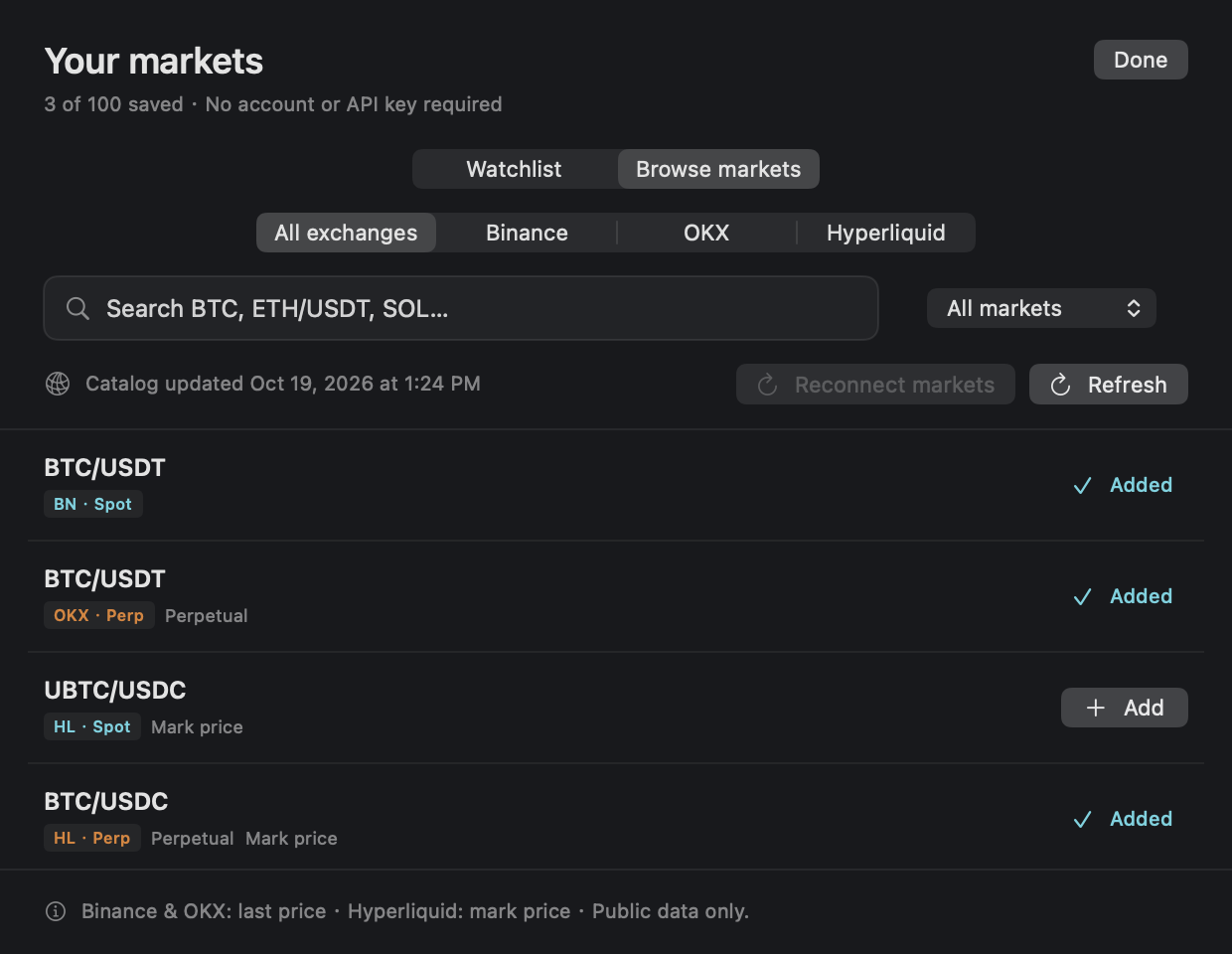
Three sources. Clear identities.
The catalog comes from each exchange. Listed instruments can change, and availability depends on the exchange and your region. Refresh markets if a newly listed instrument is missing.
- Binance: Spot, USDⓈ-M Futures and COIN-M Futures.
- OKX: Spot, perpetual swaps and delivery futures.
- Hyperliquid: Spot and the main perpetual market; builder-deployed HIP-3 markets are not included.
- Binance and OKX display last prices. Hyperliquid displays mark prices, so its value may differ from a recent trade.
One price, or a small rotation.
In Settings → Display, choose Market price. Keep a fixed market for a quiet display, or choose rotation and select up to five saved markets plus an interval. Rotation pauses while you hover, expand the island or view an alert, so the item does not change while you read it.
Classic keeps the presentation compact. Detailed adds trading-pair, market and contract labels. Market settings also let you choose price precision, price colors and whether to show the 24-hour change. Low-priced assets are not limited to two decimal places.
The watchlist can hold more instruments than the rotation. Start with the few you actually check; you do not need to cycle through every saved market.
A last price is not a live promise.
Prices update as the app receives exchange data. A quiet instrument, unavailable exchange, network interruption or regional restriction can stop fresh updates. Pay attention to Waiting for data, Reconnecting and delayed-data states rather than treating a retained price as current.
This is a desktop display, not an order terminal. It does not place trades. Supported Macs use Apple silicon with macOS 14 or later; on a screen without a notch, the island can sit at the top edge. Private beta downloads require an access password on the homepage.
FAQ
A few useful answers.
What can I try?
Try 3 live markets, charts, pinning and rotation, plus accounts, positions and alerts for 48 hours. The second market page requires Pro. After the trial, all app features require a valid license; saved settings are kept.
Why is my price different from another website?
Check the exchange, spot versus derivative contract, quote currency and price basis. Hyperliquid uses mark prices in CryptoIsland. Different sources and receipt times can produce different values.
Can I add any token?
You can add instruments returned by the supported exchange catalogs, not arbitrary token contract addresses. A token must be listed in a supported market and accessible from your region.
No API secrets or wallet details needed.